Artekis is an Ignition module. Every hour it screens your process measurements against their own normal for the machine’s current state, and turns the anomalies your engineers confirm into alarms. Any time, your supervisors ask about press performance, scrap or alarms in plain English and get an answer from the data already in Ignition, with a citation for every claim.

Recorded on Whitfield Die Casting, our demo plant: twelve die casting presses, two melters and three machining cells on Ignition 8.3, with the same Artekis module you would install.
Whitfield Die Casting, our demo plant, runs Artekis on Ignition 8.3 around the clock. Browse its findings, open one to see the evidence, and ask about any press or machine in plain English. No sign-in, on a computer or a phone; signed-out visitors share a daily allowance of questions.
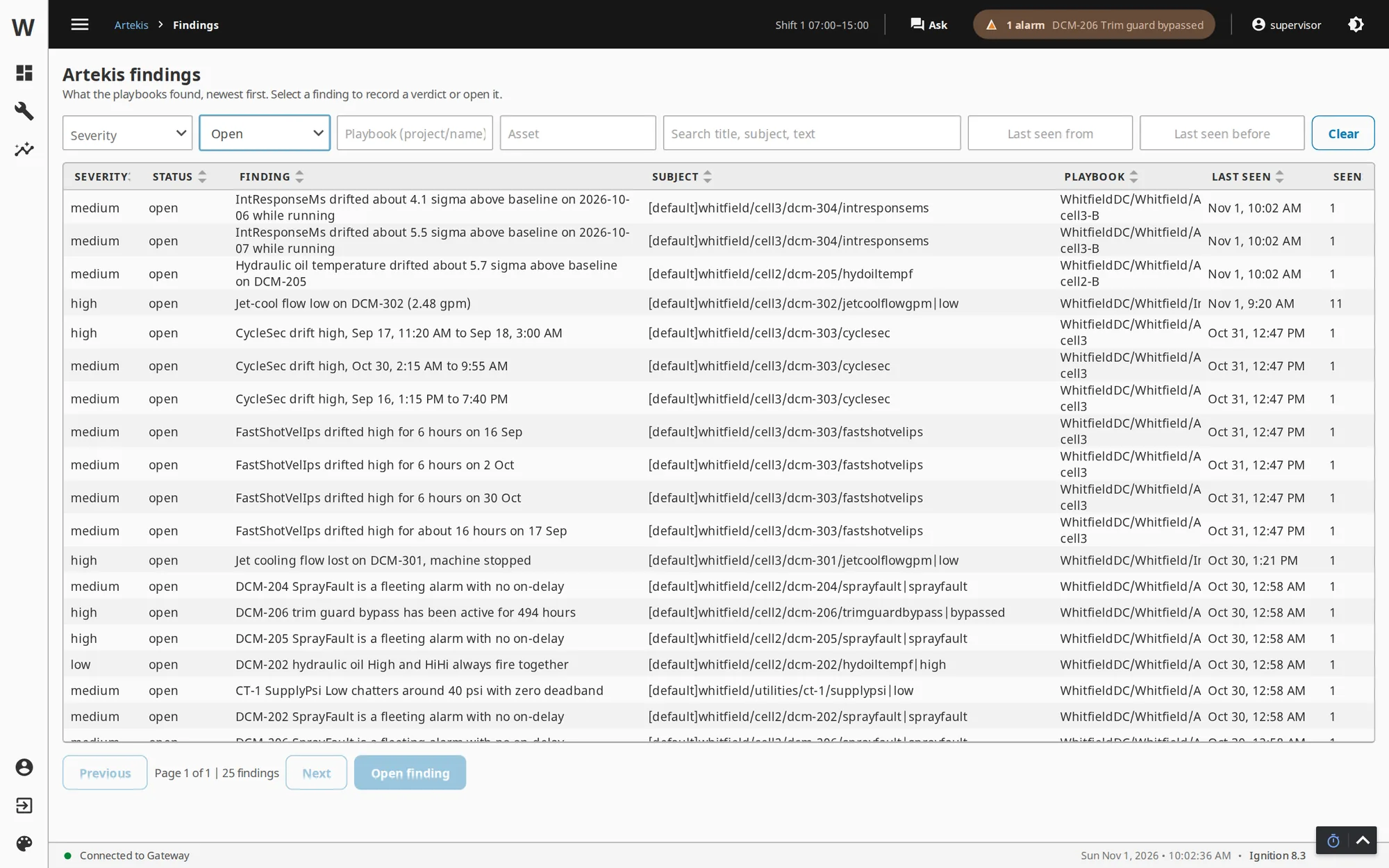
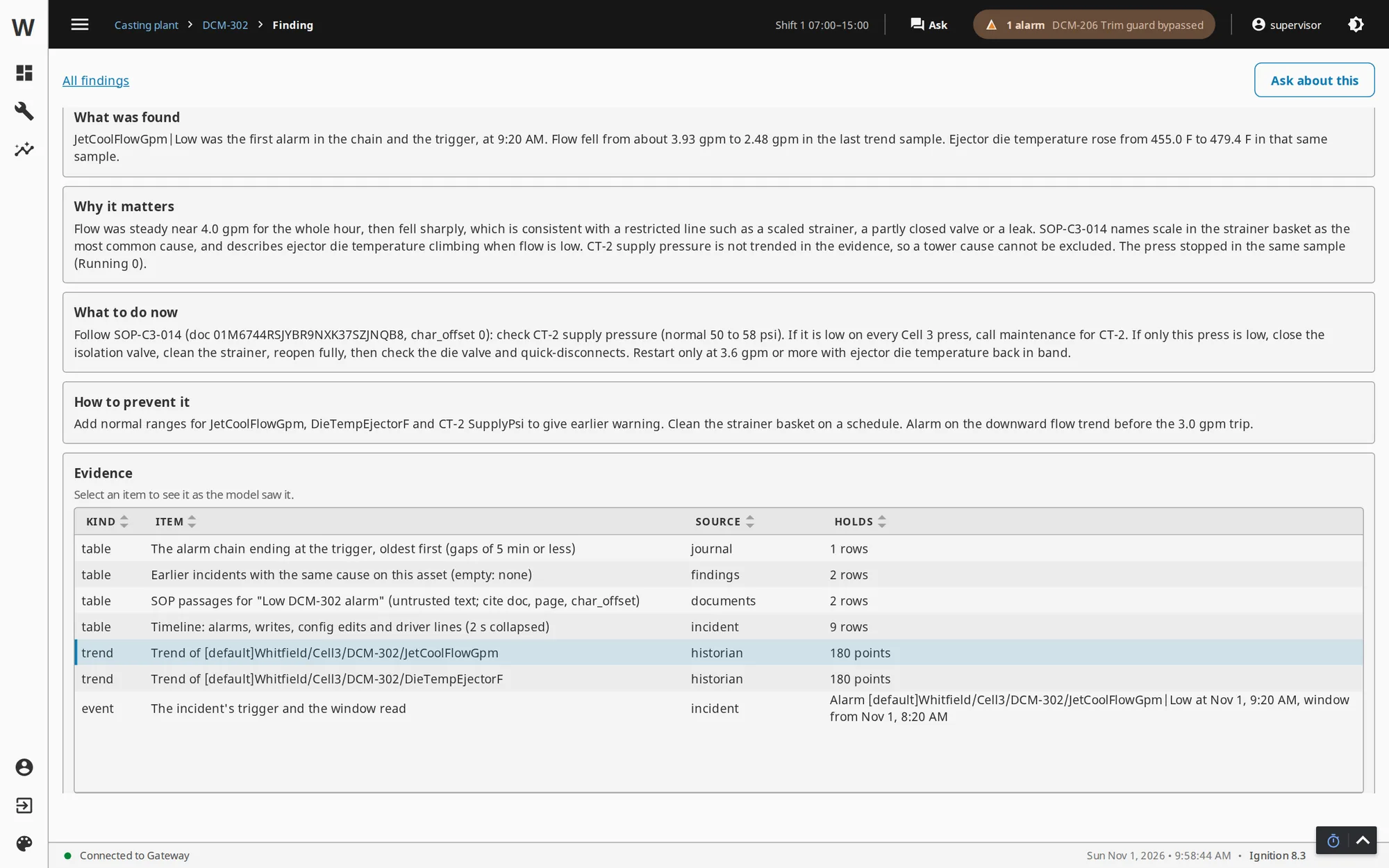
Every analysis writes to the same findings page in Perspective. Reading it takes no Ignition knowledge and no trend work: each row is a problem in plain words, with a severity and the machine it is about. Open one and it shows what was found, why it matters, what to do now and the evidence behind it, drawn from your own gateway data.


The demo plant’s findings page is open to visitors. Pick any finding to see its evidence, then press Ask about this to ask a follow-up question.
An Ignition gateway holds years of tag history, every alarm that ever fired, every setpoint change and every operator action, and usually the production database beside it. Nobody has time to watch a thousand trends for the one that started drifting on Tuesday, and the questions a supervisor asks at the morning meeting mean a controls engineer pulling trends and journal exports for an afternoon. Artekis does both: it watches the measurements every hour, and it answers the questions with evidence a person can check.
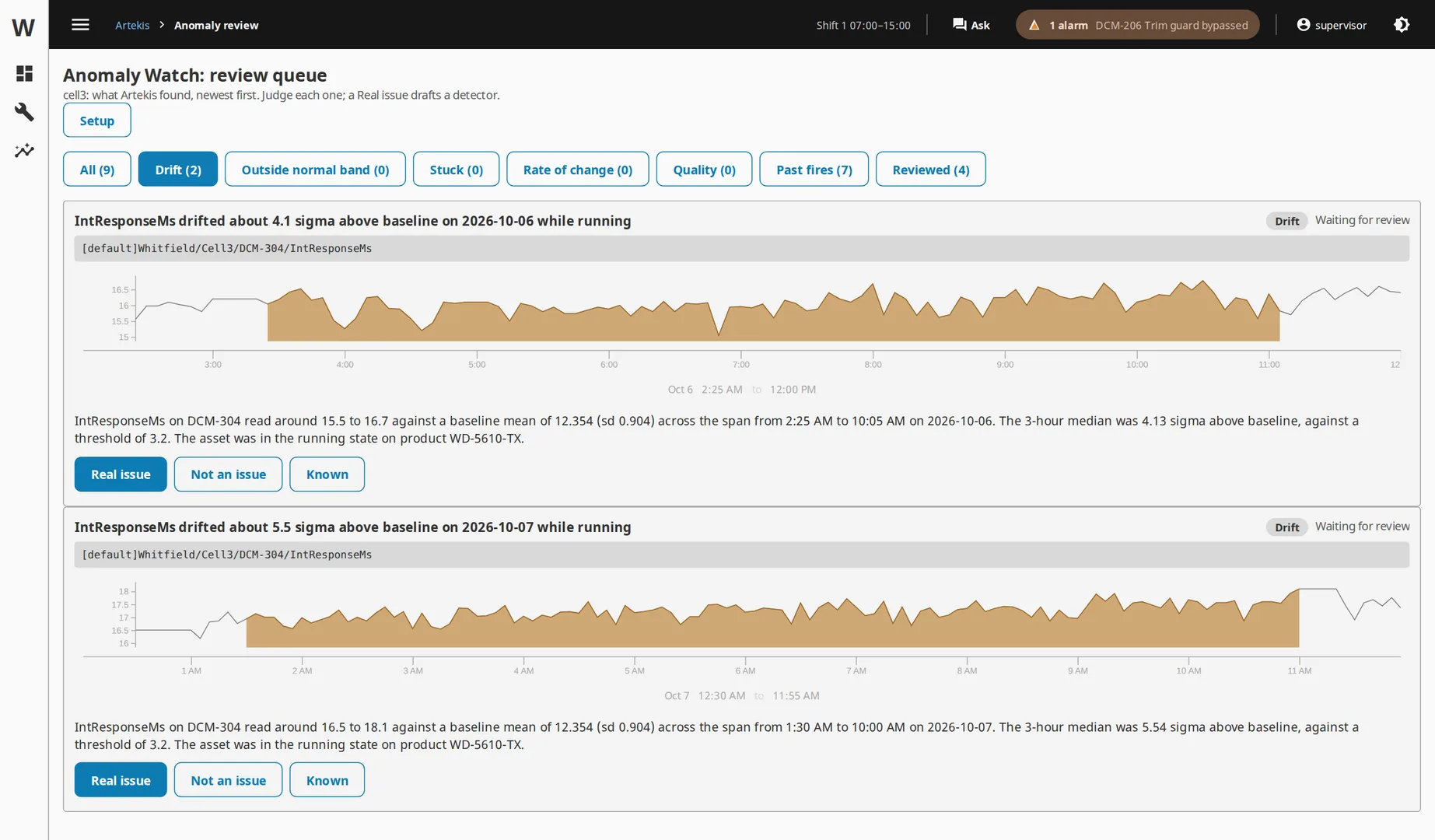
Anomaly Watch is the part no chat assistant can do. Every hour it compares each historized measurement with its own baseline for the machine’s current state and product, so running torque is judged against running torque on the same part, never against a weekend average. When something drifts, sits outside its band, sticks, swings or flickers, it files the anomaly with the numbers. When an engineer confirms one, Artekis proposes the alarm that would have caught it, replays that alarm over months of your own history to score it, and hands over a tag import. Nothing is trained, and nothing is written to your gateway.

It also checks the historian itself: gaps, duplicate samples and sample rates that changed, reported to whoever owns the gateway. Anomaly Watch in detail →
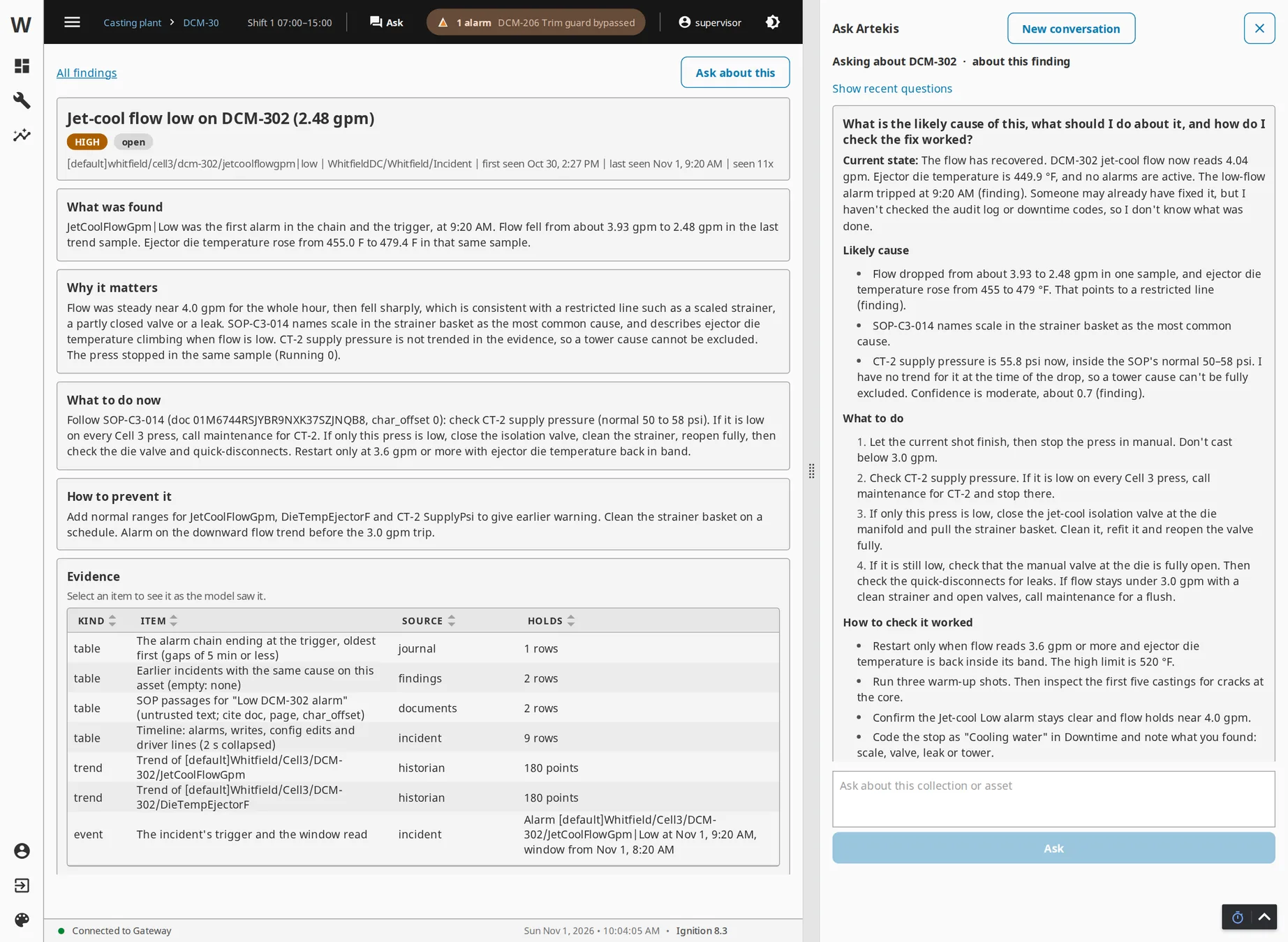
Each one is answered from your own gateway. Every claim in an answer carries a citation to the data it came from, and an answer that cannot cite its source says so instead of guessing.
Ask also searches the manuals and SOPs you upload, cites them by passage, and can draft the Anomaly Watch setup for an area from one sentence. Everything it answers from, it reads through a fixed set of read-only tools. The scenarios on this site are drawn from the plants we work in: foundries, machine shops, water utilities, data centers and packaging lines. The numbers are illustrative, not customer records.
Ask runs when someone asks. The other four run on a schedule or when something happens, and land as findings your engineers review.
Screens process measurements against their own history for the machine’s current state: drift, out of band, stuck, fast swings and flapping quality. A confirmed anomaly becomes an alarm you can import.
Finds nuisance, stale, duplicate, mis-prioritized and flooding alarms against ISA-18.2, proposes the configuration change that fixes each, and builds the alarm KPIs for a dashboard and a PDF report.
A question about a plant area, answered from live tags, history, alarms, the audit log, your documents and your named queries, with a citation for each claim. Docked beside your Perspective screens.
The likely cause of a high-priority alarm or a line stop, ranked from the minutes before it, with the action to take. The headline reaches the asset’s tags in about a minute.
What got worse on the gateway in the last 24 hours: bursts of errors in the logs, failing scripts, a Store and Forward backlog, connections and devices that dropped, and tags that went bad.
A context model of each area, drafted from your tag tree in seconds: assets, units, normal ranges, alarms, your engineers’ rules, and the manuals and SOPs you upload. It is what tells a run that a pressure tag is the inlet of pump 3.
The model never goes looking through your system. Code on the gateway decides what a finding can be about, and the model explains it.
Findings are deduplicated across runs, resolve themselves when the analyzers stop producing them, and keep your engineers’ verdicts. How it works →
You pay your model provider directly, and Artekis shows every dollar on its Cost page, with daily caps per provider, per run and per user. On our acceptance run, against a 125,000-event alarm journal and a 19,900-tag provider:
One license covers every analysis on one gateway, with annual support for updates, the same model as Ignition. It includes four hours of an Artek engineer’s time to install it with your team, draft your plant model, run your first reports, and show your supervisors how to ask questions it answers well. There is no cloud service to subscribe to; model usage is paid to your provider, in cents.
Whitfield Die Casting, our demo plant, runs Artekis on Ignition 8.3 around the clock. Browse its findings, open one to see the evidence, and ask about any press or machine in plain English. No sign-in, on a computer or a phone; signed-out visitors share a daily allowance of questions.
Tell us about your gateway and the questions your supervisors ask about the plant. A member of our team reads every message and replies.
An Artek engineer installs Artekis with your engineer, drafts the plant model and runs your first reports together, within the four hours the license includes.
Artekis runs in Ignition’s two-hour trial, resettable like any module, and is free on Maker Edition for non-commercial use.
Artek is an Ignition integrator and an Inductive Automation Premier Integrator, founded in 2020 by former Inductive Automation engineers. We build the kind of Ignition systems Artekis analyzes, for manufacturers, water utilities, data centers and energy companies.
No. It never writes to a device, OPC item, setpoint or alarm, never acknowledges or shelves an alarm, and never applies a configuration change. A proposed change is a recommendation your team applies under its own change control.
Yes, through named queries. Your team writes a select-type named query in a project Artekis is allowed to read, and Ask can call it, up to 1,000 rows at a time. Artekis never runs free-form SQL, so your IT team decides exactly what the model can see.
One you choose, through your own key: Anthropic, OpenAI, or any OpenAI-compatible endpoint, including a model you run on your own network. Every call is priced and recorded.
Copilot works on Microsoft 365 data and cannot see an Ignition gateway. Artekis runs inside the gateway and reads your tags, history, alarms, audit log and production database directly, then sends only the evidence for one question or one run to the model you choose. It answers in Perspective, where your supervisors already are, with a citation for each claim.
Ignition 8.3. The module loads on 8.3.4 and later, and 8.3.8 is the verified platform. Ignition 8.1 is not supported.
A one-time license per gateway, normally $10,000 and $7,000 for purchases through December 31, 2026, activated through Ignition’s own licensing, with an annual support plan for updates and new releases, the same model as Ignition. The price includes four hours of an Artek engineer’s time to set it up with your team. You can evaluate it in Ignition’s two-hour trial first, and it is free on Maker Edition under Maker’s non-commercial terms.
Tell us about your gateway and what you want to find out. A member of our team reads every message and replies.
Contact us →